Plumber website in Quebec: what makes the phone ring
- Written by
- Victor Frangov
- Published
- Reading time
- 9 min read
When a water heater starts leaking at 10 p.m., the customer often looks for a plumber on their phone, standing in water, and calls the first one who seems reliable and available. Within a few seconds, your website has to show them that you do this kind of work, that you come to their area, that you hold a licence and how to reach you.
We went through the rules of the Régie du bâtiment du Québec (RBQ), the Corporation des maîtres mécaniciens en tuyauterie du Québec (CMMTQ), Google and the OQLF, as they stood in October 2026. We don't have a plumber among our clients: the examples come from sites we built for other service businesses in Greater Montréal and on the South Shore. The same advice works for an electrician, a roofer or a general contractor.
Is your phone number tappable and visible on mobile?
Your phone number should sit at the top of every page as a link that starts a call when someone taps it (a “tel:” link, technically). Write it as text: a number inside an image can't be tapped, and Google can't read it.
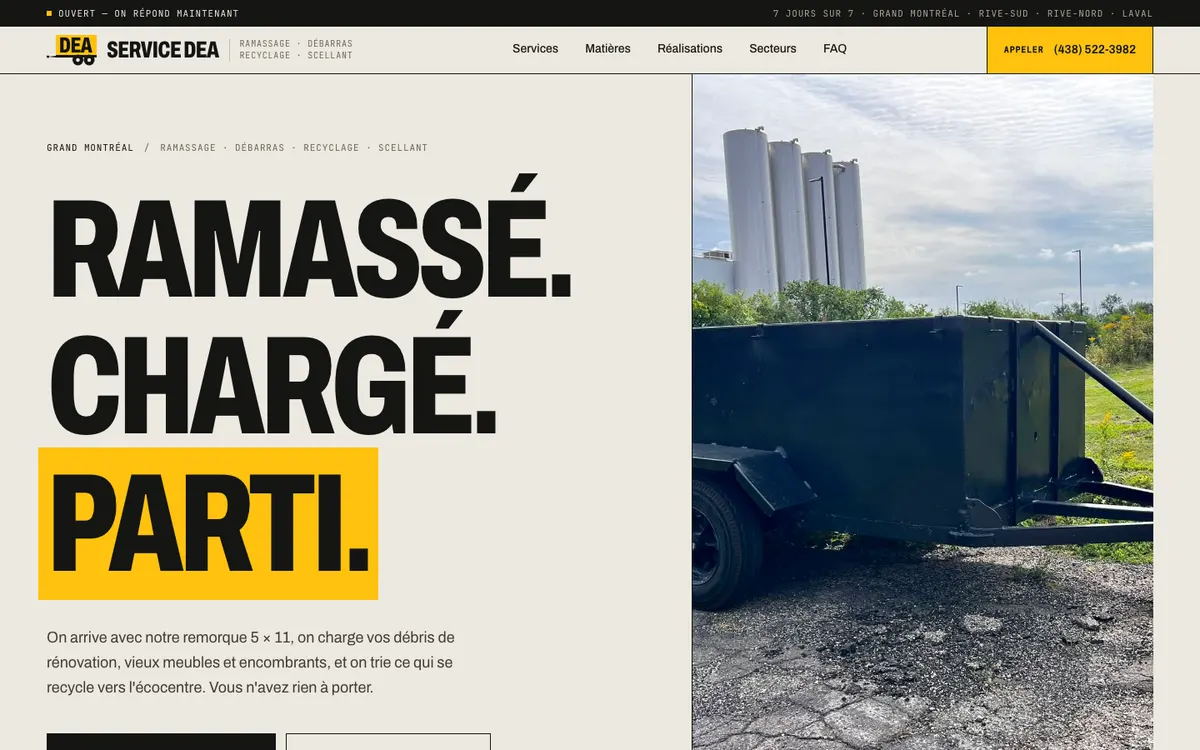
On mobile, a call bar fixed to the bottom of the screen keeps the number under the customer's thumb while they scroll. We did this for Service DEA, a debris removal company in Greater Montréal that books its jobs by phone: the call button is always in reach, and a live open or closed badge follows its 7:00 to 20:00, seven-days-a-week schedule.
For emergencies, say exactly what you do. Do you take calls in the evening and on weekends? For which problems: water damage, sewer backup, water heaters, frozen pipes? In which areas? If your “24/7 service” is really a voicemail you return the next morning, the customer will find out at 2 a.m. and may well mention it in their Google review. A precise line such as “emergency calls 7 a.m. to 10 p.m., 7 days a week” is more reassuring than a vague promise.
The hours on your site should match the hours on your Google Business Profile. If you handle emergencies outside those hours, explain how it works on a separate page, with the number to call.
RBQ licence and CMMTQ: what to show on your website
The RBQ requires every contractor who promotes their services on a website or on social media, business or personal accounts alike, to show their licence number there. The number has 10 digits and must be written as “RBQ licence: XXXX-XXXX-XX”. The same rule covers all advertising (business cards included), estimates, quotes, contracts and invoices, job site signs that carry the company name, and lettered vehicles on public roads or job sites. The RBQ does, however, prohibit displaying its logo or the flag of the Government of Québec.
In plumbing, the CMMTQ issues plumbing and heating contractor licences on behalf of the RBQ, and you have to be a member to get one. A “CMMTQ member” mention next to your licence number tells the customer you are allowed to do the work. For electricians, the equivalent body is the Corporation des maîtres électriciens du Québec (CMEQ). Before you put a corporation's logo on your site, ask it for its usage rules.
According to a June 2024 SOM survey cited by the RBQ, 93% of Quebecers think it is important for a contractor to hold a valid licence, but only 16% of homeowners check it before work starts. The RBQ runs campaigns urging people to look contractors up in its licence holders register. Put your number in the footer of every page and on your contact page, so a careful customer finds it without having to ask.
Are city pages a good idea or a Google trap?
Many contractor sites have a “Plumber Longueuil” page, another for “Plumber Boucherville”, and so on, all identical except for the city name. Google's spam policies cover this under doorway abuse: pages created to rank for specific, similar search queries that lead users to intermediate pages less useful than the final destination. One of Google's examples is having multiple pages targeted at specific regions or cities that funnel users to one page.
An area page earns its place when it says something specific to that area: your real response time, photos of jobs done nearby, which services you offer there, the city's backwater valve requirements if it has any. If you have nothing particular to say about a city, one “Areas we serve” page listing your municipalities is enough. Service DEA, for example, lists its areas (South Shore, North Shore and Laval) on its home page, and structured data describes its territory to Google.
That list should match the service area on your Google Business Profile, which Google asks you to keep within about two hours' drive of your base. Only include areas you really cover: a customer in Longueuil who waits three hours because you were across Laval won't call you again.
Google Business Profile and reviews: how do they connect to your site?
When someone searches for “plumber Longueuil”, Google often shows business profiles with the rating, reviews, hours and a call button. If you work at customers' homes and don't receive anyone at your address, Google asks you to hide the address and set a service area; its own example is a plumber who runs the business from home. If you have a counter where someone receives customers during your stated hours, your profile can show both the address and a service area.
According to Google, local results are based mainly on relevance, distance and prominence, meaning how well known the business is. Google says more reviews and positive ratings can improve your local ranking, and that there is no way to pay for a better one. Ask for a review after every job, for example by text message with the link to your profile, and reply to reviews, the bad ones as well as the good.
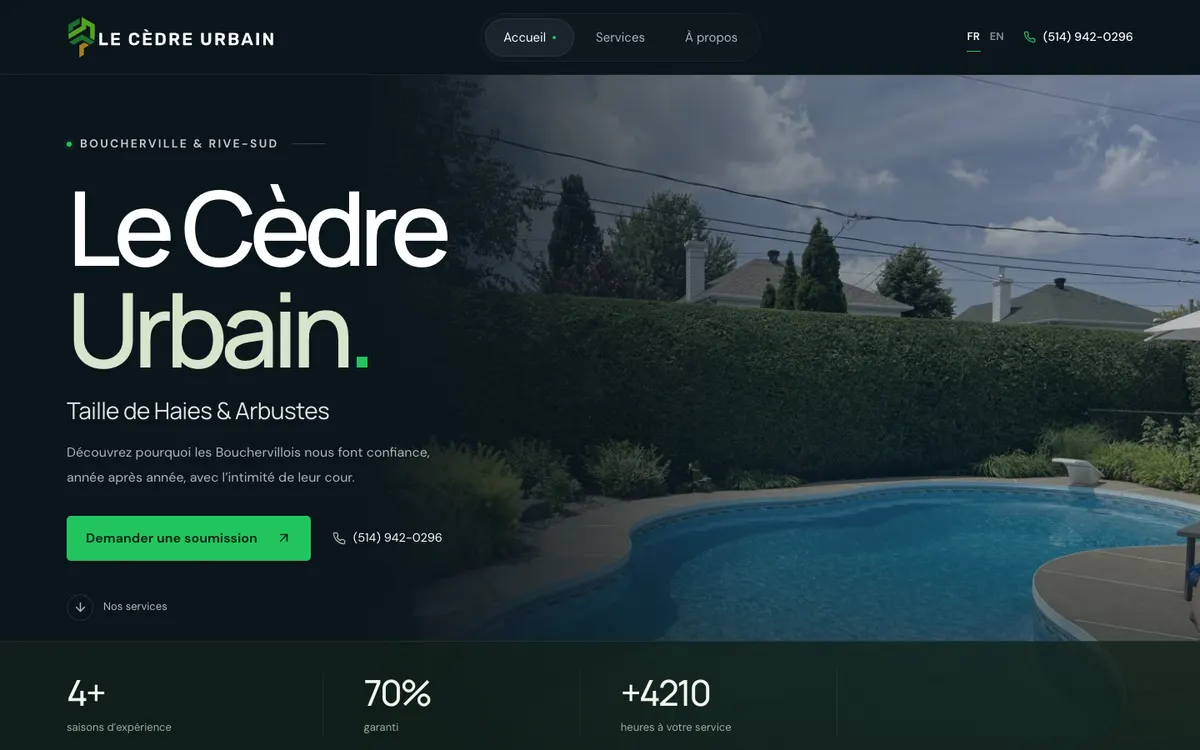
On your site, put your rating and a few reviews near the call button, with a link to the profile. The home page of Le Cèdre Urbain, a hedge trimming company in Boucherville, leads with the South Shore, its Google rating and its services. Keep the same business name, number and hours on your site and on your profile.
If your calendar is already full through word of mouth and contractors who send you their jobs, a well-kept Google profile may be enough for a while. A website becomes useful when you want to win over people who don't know you yet.
What photos should a plumber put on their website?
Photos of your real work: the neatly installed water heater, the bathroom before and after, the redone water service line, your truck. Stock photos that the customer has already seen on other sites tell them nothing about you.
The truck is a good example. The RBQ requires vehicles that display the company name to show the licence number, so a photo of your lettered truck shows your team and your licence at the same time.
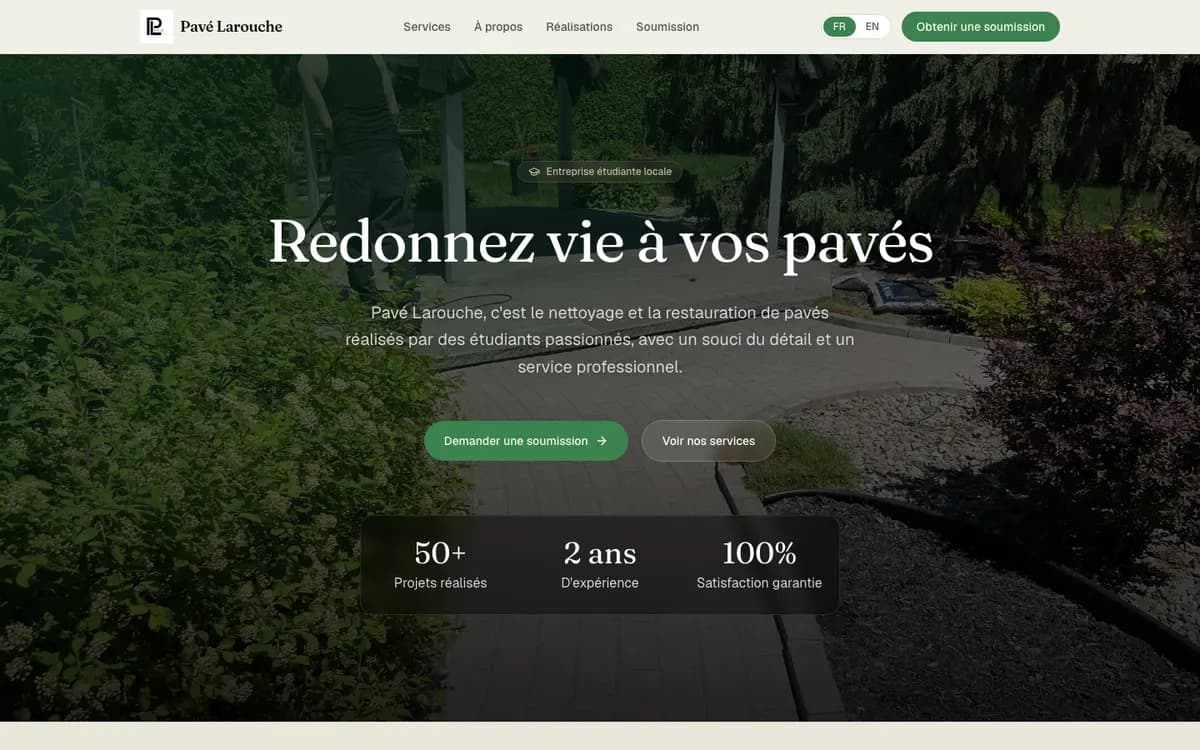
Ask the customer's permission, frame the shot so no address or personal details show, and compress your images so they don't slow the page down. For Pavé Larouche, a student-run paver cleaning business on the South Shore, we built a before/after section with drag sliders on real job photos, and every image is compressed to WebP to keep the page light.
Mobile speed and quote forms: what should you aim for?
Google publishes thresholds for its Core Web Vitals, measured at the 75th percentile of page views: the main content should appear within 2.5 seconds (LCP), the page should respond to a tap within 200 milliseconds (INP), and the layout should barely move while it loads (a CLS of 0.1 or less). You can test your page for free with PageSpeed Insights. On contractor sites, the usual causes of slow pages are oversized photos, a carousel at the top of the page, and chat or tracking tools that load before the content.
In an emergency, the customer calls. The form is for requests that can wait a day: a water heater replacement, a bathroom redo, plumbing for a basement you're finishing. Keep it short: name, phone, address or city, a description of the problem, and an option to attach a photo, which helps you estimate the job before you drive out.
The right number of fields depends on what you need to give a price. Pavé Larouche's form asks only for a name, email, phone (optional) and a message, and the team replies within 24 hours. Le Cèdre Urbain's is more detailed (address, property type, services, preferred timing) and confirms each request with a reference number, so the team can price the job without a round of phone calls. Both check the information before it is sent. Since a form collects personal information, also publish a privacy policy, as Quebec's Law 25 requires.
Does your website have to be in French first?
Yes. According to the OQLF, consumers have the right to access a complete French version of the website of a business operating in Quebec. An English version is allowed, as long as the French is at least equivalent: the same pages and the same information, forms included.
In Montréal and on the South Shore, the practical question is often about English. If some of your customers are English speakers, a complete English version helps you show up in their searches. Have it written or reviewed by someone who knows the trade: machine translation can quickly turn a “clapet antiretour” into an “anti-return valve” when your customers are searching for a “backwater valve”. On Le Cèdre Urbain's site, French is the default and the language switcher keeps visitors on the page they were reading.
Checklist: what goes on a plumber's home page?
From the top of the page to the bottom, check that you have:
- A tappable phone number in the header, and a fixed call bar on mobile.
- One sentence that says what you do and where, for example “residential and commercial plumbing in Longueuil and on the South Shore”.
- Your hours and a clear note on emergencies: which days, which hours and which problems you take.
- Your Google rating and a few recent reviews, with a link to your profile.
- Your main services, each linking to its own page: emergencies, water heaters, drain cleaning, bathrooms.
- The list of areas you serve, the same as on your Google profile.
- Photos of real jobs, your team and your truck, properly compressed.
- “RBQ licence: XXXX-XXXX-XX” and “CMMTQ member” in the footer of every page.
- A short quote form with an option to attach a photo, and a link to your privacy policy.
- French by default, and a complete English version if you serve English-speaking customers.
- A page that loads quickly on mobile, checked in PageSpeed Insights.
Frequently asked questions
Does a plumber have to show their RBQ licence number on their website? Yes. The RBQ requires every contractor who promotes their services on a website or on social media to show their licence number there, written as “RBQ licence: XXXX-XXXX-XX”. Displaying the RBQ logo or the flag of the Government of Québec is prohibited.
Do you have to be a CMMTQ member to be a plumbing contractor in Quebec? Yes. The CMMTQ issues plumbing and heating contractor licences on behalf of the RBQ, and membership is required to get one. For electricians, the CMEQ plays that role.
Does Google penalize city pages on a contractor website? Google treats near-identical pages created for each city to rank for similar searches as spam. An area page with information specific to that area, or a single page listing the areas you serve, does not fall into that category.
I work from home: do I have to show my address on my Google Business Profile? No, not if you don't receive customers there. Google asks you to hide the address and set a service area instead, extending no more than about two hours' drive from your base.
How much does a website for a plumber cost? At Kollowo, a website costs $1,000 to $2,000: the lower end for a basic site, the higher end for a more developed one (more pages, bilingual, extra features). The details are on our pricing page.
Sources
- RBQ: Displaying your licence
- RBQ: Advertising campaigns, SOM survey of June 2024 (in French)
- CMMTQ: Becoming a building mechanical contractor (in French)
- Google Search Central: Spam policies for Google web search (doorway abuse)
- Google: Guidelines for representing your business on Google
- Google: How to improve your local ranking on Google
- web.dev: How the Core Web Vitals metrics thresholds were defined
- OQLF: Language of commerce and business, your rights as a consumer (in French)